Big "phone", small "tablet", or "unnecessary
hybrid"?
Questions emerge uncontrollably around the Samsung Galaxy
Note; strangers can’t help it
Is 5.3-inches of Android more than any man, woman or child
should be expected to stomach, or has Samsung’s scattershot
approach to mobile device sizing struck gold this time around?
Read
on for the full tipsengine review.
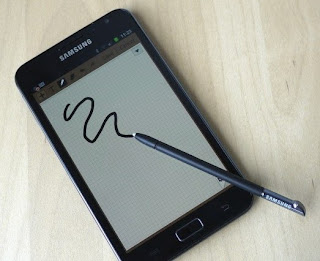
Samsung Galaxy Note: S-Pen:
Samsung isn’t the first mainstream
mobile company to offer a digital stylus this year – HTC already
released the Flyer which can be used with a special pen – but its
implementation is the best we’ve tried so far. Unlike HTC’s
restrictive system, where the pen could only be used in certain
places of the OS, Samsung allows you to pick either your finger, the
stylus or both when you negotiate through Android. When you take into
account how readable webpages are, even fully zoomed out, on the
HD-capable screen, the fine nib of the pen is mighty handy to tap on
a smaller link.
Of course, Android 2.3 Gingerbread, as
runs on the Galaxy Note, isn’t set up for pen use, and Samsung has
followed HTC in developing its own S-Pen APIs and custom apps to make
the most of its extra input option. Those APIs will be opened up to
developers with an S-Pen SDK in December, with Samsung already
working with some art and enterprise developers to deliver pen-aware
apps through its own app store on the Note.
What’s unclear at this stage is how
Samsung’s SDK will sit with the native pen support added to Android
4.0 Ice Cream Sandwich. The Galaxy Note looks likely to get an
upgrade to Ice Cream Sandwich early in 2012, but so far it’s not
certain how much overlap there is between Samsung and Google’s
approaches to the stylus, or indeed where HTC’s fits in. That could
leave three different strands for developers to deal with – the
official Google way and two ways where manufacturers have jumped the
gun – and might leave them wary of producing apps specifically for
the Galaxy Note.
In addition to the pressure-sensitive
nib, there’s a side-mounted button that triggers secondary
functions. Hold it down and double-tap, for instance, and one of
Samsung’s “Post-It” style notelets pops up. Hold it down and
tap-hold, meanwhile, and you can take a screenshot. Press and swipe
up opens the context menu, while pressing and swiping left goes back.
The frustration is how small and tricky to press the button is – we
often had to do some stylus-twiddling with our fingers before we
could locate it with a fingertip, something which could’ve been
addressed with some simply texturing – and on one occasion we tried
to pull the pen from its silo on the bottom of the Galaxy Note and
instead pulled off the top section. Some judicious twisting
reattached both parts, but then seemed to block the side-button’s
movement; a little more twisting fixed that too.
Hardware
Samsung had arguably been resting on
its AMOLED laurels with recent GSII-variants, making do with WVGA
resolution and counting on image quality to offset a shortage of
pixels, but the Note quickly brings things bang up to date. The only
criticism we can level – on paper at least – is Samsung’s use
of a PenTile display, which lacks sub-pixels and can leave screens
with a color tinge. In practice, it’s not something we noticed in
our time with the phone.
Other specs are
familiar from the Galaxy S II line, along with the design. The
plastic chassis is sturdy, though the battery cover – as always –
feels flimsy and delicate when you prise it off. A physical home
button below the display is flanked by touch-sensitive menu and back
buttons, while a 2-megapixel front-facing camera sits above the
display. On the back is an 8-megapixel autofocus camera with LED
flash and support for 1080p 30fps video recording. A microUSB port on
the bottom handles charging/syncing, while the power/lock button is
on the upper right edge – slightly too high and tricky to locate on
first stab, in our experience – while the volume rocker is on the
left edge – also slightly too high and slightly too short for
entirely comfortable use.
The Samsung Galaxy S II looked vast
when we first saw it; the Galaxy Note knocks its smaller cellular
sibling into the proverbial cocked hat. At 146.85 x 82.95 x 9.65 mm
and 178g it’s certainly a handful, though the sub-centimeter
thickness does mean it’s still relatively straightforward to slip
into the front pocket of your jeans, assuming they’re not
hipster-tight. It’s also faintly ridiculous to hold to your head
during voice calls, like you’re resting your face against a broad
Swedish cracker-bread, only smoother
Still, you can’t argue with why
Samsung opted for such outré dimensions: the Galaxy Note offers a
5.3-inch Super AMOLED HD display running, as the name suggests, at an
eye-searing 1280 x 800 resolution. Like all of Samsung’s Super
AMOLED panels before it, viewing angles are so broad that, from the
side, the display looks painted on. Colors are vibrant, blacks as
dark as a distant nebula.
Inside, Samsung has opted for a 1.4GHz
dual-core processor, paired with 1GB of RAM and either 16GB or 32GB
of internal storage. A microSD card – under the battery cover, next
to the capacious 2,500 mAh Li-Ion battery pack – can extend that by
up to 32GB. Wireless connectivity includes quadband WCDMA/UMTS with
support for up to 21Mbps HSPA+, quadband GSM/EDGE, WiFI a/b/g/n on
the 2.4GHz and 5GHz bands, and Bluetooth 3.0+HS. No dedicated HDMI
port, but the microUSB 2.0 port supports MHL HDMI with the correct –
and not included – adapter. There’s obviously GPS, a digital
compass, accelerometer, gyroscope and the proximity/light sensors,
together with an FM radio with RDS that uses your wired headphones as
an antenna.
In short, it’s a device that’s at
the top of its game when it comes to hardware, though Samsung hasn’t
left its screen to wow on merely proportions and pixels. Instead, the
Koreans turned to Wacom and a clever digital stylus, to prove that
there’s still a place in mobile for the pen.
S-Pen Stylus
It didn’t take Steve Jobs’ comments
on the stylus – “If you see a stylus they blew it” – to sour
opinions on the mobile matchstick, but they certainly did pen-toting
tablets and smartphones no favors. There’s more than one way to
implement a digital pen, however, and Samsung’s system deserves
more than a second glance.
Rather than relying on a resistive
touchscreen, or an inaccurate capacitive stylus, the Galaxy Note uses
a Wacom active digitizer system. Wacom is best known for its artists’
tablets, but the company also has a history of supplying Tablet PC
manufacturers with digitizers for their pen-enabled Windows slates.
Microsoft’s platform may not be so hot with a pen, but that’s not
Wacom’s fault: the company offers a digital inking experience
that’s silky-smooth, free flowing and accurate, not to mention
pressure-sensitive.
Software
Samsung hasn’t been shy when it comes
to throwing colorful widgets at the Android 2.3 Gingerbread
homescreen, and out of the box there are lashings of eye-catching
tickers, calendar reminders, news alerts, weather panes, note
shortcuts and more. In fact there’s comparatively little room left
on the first five of the seven homescreen panes for actual app
shortcuts; TouchWiz offers five persistent icons running along the
bottom of the display – the rightmost being a dedicated
Applications key but the others user-customizable – but we had to
ditch some of Samsung’s chunkier widgets to squeeze our most-used
apps within reach.
Obviously there are the normal array of
Android titles, like Gmail, YouTube, Google Maps and the Android
Market, but Samsung has thrown some of its own in too. The three Hubs
– Social, Music and Readers – are brought over from the Galaxy S
II, offering Facebook/Twitter/LinkedIn aggregation, MP3 downloads and
ebooks/magazines/newspapers respectively, as has the AllShare DLNA
media streaming app, for funneling across photos, music and video to
a DLNA-compliant TV or other system.
Samsung Galaxy Note: Apps
Photo Editor and Video Maker have been
upgraded to suit the Galaxy Note’s boosted multimedia appeal, each
becoming capable little editing apps in their own right. Photo Editor
supports advanced selection, morphing, warping, special effects and
other enhancements, while Video Maker allows you to not only combine
video clips, music and photos into a trimmed down timeline, but jot
handwritten notes on top of the results. Rendering then takes a short
while, after which point you can upload directly to YouTube for
sharing.
Kies Air, as we’ve seen before,
allows you to wirelessly connect to the Galaxy Note from the browser
of a computer on the same WiFi network, and access multimedia,
contacts, read/send SMS messages and more. It’s sluggish if you’re
trying to transfer the Full HD video the Note is capable of
capturing, but otherwise can be a useful tool. Alternatively, you can
plug the Note in via USB and mount it as an external drive.
The other
preloaded apps are more specific to the Galaxy Note, having some
interaction with the pen. Crayon Physics is a 2D physics puzzle, with
cutesy graphics hiding some increasingly tricky challenges,
potentially too difficult to use as a way to occupy your kids;
instead, head into the Samsung Apps store – there’s a S Choice
app too, which at the moment redirects to the regular apps store –
and you’ll find some more child-friendly drawing options like Hello
Color Pencil and Hello Crayon (the majority of which are free).
Polaris Office and
Mini Diary round out the apps with which we’re familiar, offering
respectively a way to open and work on Office files – something
surprisingly useful on the Note’s big screen – and a rather
gimmicky journalling tool that, unfortunately, hasn’t been updated
to handle ink input. Instead you can use the huge onscreen keyboard
(which has auto-correction/prediction turned off by default, but is a
lot more usable with it switched on) or the handwriting recognition.
The latter handles printed letters reasonably, but struggles with
cursive, and we quickly gave up on it.
That’s not to
say that the Note only holds up as a kid’s art tool. We downloaded
OmniSketch, announced as one of Samsung’s launch partners with the
Galaxy Note last week, and it’s a surprisingly capable art app.
Multiple brush types, color manipulation options, pressure
sensitivity and some interesting custom brush-heads were enough to
keep our entirely-unartistic fingers occupied, and we’ve seen
impressive examples of what proper artists can actually do with
nothing more than the Note and its stylus.

Those more
interested in business than pleasure get S Planner and S Memo. S
Planner turns the Galaxy Note into a Filofax alternative, thankfully
without the faux-wood that Samsung added to its custom calendar app
on the original Galaxy Tab. Year, Month, Week, 3 Days, Day, Agenda
and Task views are supported, flicked between by auto-hiding tabs
along the right edge of the display. The Galaxy Note’s huge screen
comes in useful here again, making the Month view surprisingly usable
– in portrait orientation you get the full month with enough space
to make out individual appointment details on the agenda, together
with a list of today’s meetings underneath – in comparison to
most smartphone calendars. Unfortunately you can’t actually
scribble a new meeting in using the pen, though you can attach (or
create) a handwritten memo to each appointment.
That’s done with S Memo, probably
the example of pen integration that general users will encounter the
most. At its most basic it’s a Post-It replacement – you can
either do the stylus double-tap shortcut to call up a small notelet,
or open the app itself and get a full-screen note supporting
different color inks, types of pen (including highlighters) and the
ability to mix together hand-drawn diagrams, pasted photos and even
attach audio recordings.
What makes it usable is the accuracy of
the digital stylus. The HTC Flyer struggled as a note-taking tool
because its pen simply couldn’t ink finely enough: that meant you
could only fit a few words to a page. In contrast, the Galaxy Note is
capable of very fine lines, and even though its display is smaller
than the 7-inch Flyer, we were able to fit more text per line and per
screen at any one time. Samsung has also integrated a two-finger
panning system to move around larger notes. On the downside, HTC’s
useful Evernote integration isn’t present, which means there’s no
ability to search through handwritten notes, nor easily access them
from other devices.
Camera and Multimedia
Samsung’s smartphone cameras have
proved impressive recently, and the Galaxy Note is no different.
Although its size means it’s bordering on the somewhat ridiculous
feeling you get holding up a tablet to take photos and video, it just
about escapes that fate; brave the occasional second glance, and
you’re rewarded with colorful photos with plenty of detail to them.
A rare sunny London day offered a chance for the Note to balance
bright elements with more contrast-rich shade, though on a couple of
occasions there was some odd focus hunting where the camera seemed
reluctant to even try fixing on a subject.
Video playback benefits from Samsung’s
usually broad range of supported codecs. The Note will handle 3GPP,
H.263, H.264, MPEG4 and WMV (as well as 3GP, AAC, AAC+, AMR, AMR-NB,
eAAC+, H.263, MP3 and MPEG4 audio) and then there’s the Android
Market with its various third-party media player apps if that’s
insufficient for you. 720p HD video in H.264, MPEG4 and WMV played
back with no jerks or issues on the Note, and audio through the
headphones jack was similarly strong. On resolution and scale, it’s
hard to imagine a better way to consume video on your smartphone than
the Note.
Video, meanwhile, showed more of that
jittery focus, struggling at times to handle the slow moving traffic
in our sample clip below. Brighter parts of the scene suffer
over-exposure, too, though when the frame is stable things are far
more palatable. Audio is sensitive, perhaps too much so, but still
within the bounds of acceptability. Once you’ve filmed clips, of
course, you can slot them into your own mini-movies in the Galaxy
Note’s video editing app.
Phone and Battery
We’ve already mentioned that the
Note’s outlandish dimensions left us feeling self-conscious using
it for voice calls. We also struggled with earpiece positioning: the
speaker is nudged right to the very top edge of the fascia, and we
found ourselves shuffling the phone against our face during calls to
find the sweetspot for audio. When we managed that, incoming and
outgoing audio were both fair, while the speaker – on the back of
the Note – is loud if subject to the usual distortion at higher
volume levels. Of course you can also use a Bluetooth or wired
handsfree kit, which leaves you free to stab at the Note’s display
mid-call.

Given the processor, the size of the
display and the active digitizer, we had low expectations of the
Galaxy Note’s battery life. Daily charging has become de rigeur for
modern smartphones, and we had visions of making it to mid-afternoon
and then being forced to rejuice the Note with a sneaky top-up. Even
Samsung’s predictions of up to 810 minutes of 3G talktime or 820
hours of 3G standby left us sceptical.
Imagine our surprise, then, to find
that the Note bulldozered through our expectations. With a
combination of web browsing on WiFi and 3G, some photography, push
email turned on (and Twitter and Google+ updating in the background),
use of the stylus and note/art apps, a little Google Maps navigation,
a few text messages and a couple of short calls, the 2,500 mAh
battery got us not just through a full day but well into the next.
We’re guessing that, as on the
original Galaxy S II, Samsung is using some stringent processor
throttling to achieve that, but while there were some occasional
moments of lag common to all Android handsets, there was no real
point where we felt we were waiting for the Note to catch up. Most
importantly, apps where you need a reaction straight away – like
calling up a new S Note to quickly jot something down – were
on-screen without hesitation.
Wrap-Up
Bigger isn’t necessarily better. The
Galaxy Note will automatically be out of contention for many, simply
because of its size. For the mainstream, 5.3-inches – even with
1280 x 800 resolution – is simply too much to pocket. Sure, a
tablet-resolution matching display is great for watching video, or
browsing the web, or replacing your standalone PND with Google Maps
Navigation, but it’s a little less appealing when you factor in
portability.
There were times, in public with the
Note, when we felt a little too self-conscious to be entirely happy
pulling it out of our pocket. This isn’t a discrete smartphone you
can cradle in your hand as you check directions or thumb out a quick
text message: it’s big and obvious. All those extra pixels are
nice, but the Galaxy Nexus – with its 1280 x 720 display measuring
a comparatively compact 4.65-inches – will deliver much of the same
in a form-factor that’s a lot more user-friendly.
Niche? Certainly, but Samsung hasn’t
allowed fears of that to stop it from targeting pretty much every
segment of the mobile audience. Niche needn’t mean unimpressive,
either: what the Galaxy Note does, it does exceptionally well. Right
now, if you want the precision an active digitizer gives you, plus
more than all-day battery life, top-tier multimedia credentials and
the range of apps the Android platform is blessed with, it’s your
only choice. If you want a compact tablet that you can actually carry
out of the house without needing a bag, it’s your best option. And
if you want a smartphone that allows you to work and play and replace
your paper notebook, it’s hugely compelling in many senses of the
word “huge.”
Still, the Galaxy Nexus – even with
Ice Cream Sandwich – doesn’t give you the clever S Pen, and
that’s the Note’s real charm. Bundling a stylus isn’t
sufficient in and of itself to make a mobile device special, but when
it works well – accurate, precise, easy to use – then it
undoubtedly adds something to the user experience. If you’ve been
looking for an excuse to ditch your paper day-planner but don’t
want to bundle a small tablet with your phone, then the Galaxy Note
happily steps in to replace both.
Not for everyone, then, but that’s
part of the Android charm: a huge array of devices catering to those
for whom the “one size fits all” approach doesn’t fit. The
Galaxy Note may not prove to be Samsung’s best-seller of the
quarter, but those who succumb to its sizable charms will have a
smartphone/hybrid that’s attention-grabbing in every sense.